Introduction: When SEO Strategy Meets Document Security
Introduction: When SEO Strategy Meets Document Security
Here's something nobody talks about: the same backend chaos slowing down your GDPR compliance requests is quietly destroying your Shopify store's search rankings.
Most merchants think SEO optimization and document security live in separate worlds—one handled by marketing, the other buried in legal spreadsheets. But in 2026, that separation creates a competitive disadvantage. When your store takes 45 days to process a customer data request while competitors respond in minutes, you're not just risking €20M fines. You're signaling to search engines that your site runs inefficient, resource-heavy processes that bog down performance during peak traffic.
The connection runs deeper than most realize. Manual compliance workflows create server strain that tanks your Core Web Vitals scores. Delayed document processing triggers page speed penalties. And here's the kicker: the merchants winning organic traffic this year aren't choosing between fast workflows and secure ones—they're using platforms like Seo-Writer to automate content creation while Shopify Flow handles compliance, creating a dual advantage where speed and security compound instead of competing.
This guide shows you exactly how to build that system before your competitors do.
Why Document Workflow Speed Matters for Shopify Stores in 2026
Here's what changed in 2026: privacy compliance stopped being a "nice-to-have" and became a business survival issue. If you're running a Shopify store that serves EU customers or anyone in California, Colorado, or Virginia, you're now racing against 30-45 day deadlines for every data request you receive—and those requests are multiplying fast.
The numbers don't lie. Over 3,070 Data Privacy Officers reported increased DSARs in the past year, while businesses that nail privacy compliance see a 1.6x return on investment—proving this isn't just about avoiding fines anymore. Meanwhile, GDPR authorities issued €310 million in penalties to LinkedIn alone, showing enforcement is getting serious.
The real challenge? Modern privacy laws from GDPR to state-specific U.S. regulations now treat speed and security as one unified requirement. You can't have Fort Knox-level encryption if it takes you 60 days to locate customer data across disconnected systems. And you definitely can't afford manual processes when cookie deprecation impacts exceed privacy concerns for 69% of advertisers.
This is where platforms like Seo-Writer become critical—automating content workflows means you're not scrambling to document your processes when a DSAR lands in your inbox. The stores winning in 2026 understand that Shopify's unified commerce API provides that single source of truth for customer data, making rapid, secure responses actually possible. Fast isn't just better anymore—it's legally mandatory.

Sources cited:
- New 2025 Privacy Laws for E-Commerce
- 40 Essential DSAR Statistics & Trends in 2025
- 23 Privacy Compliance in Marketing Statistics in 2025
- 20 biggest GDPR fines so far [2025]
- Everything you need to know about GDPR compliance
- Data Integration Challenges
The SEO-Workflow Connection: How Page Speed and Data Security Impact Rankings
Here's what most Shopify store owners miss: the backend chaos of manual document workflows isn't just slowing down your team—it's quietly killing your search rankings.
When Core Web Vitals reports in Google Search Console flag performance issues, the culprit often isn't just image compression or server response times. It's the compliance bottlenecks, manual approval processes, and clunky security protocols creating server strain during peak traffic. According to Triare's 2025 analysis, when page elements become unstable and interactions lag due to background processing, search engines interpret this as poor user experience—and rankings drop accordingly.
The data is brutal. Deloitte found that a 0.1-second improvement in site speed can boost conversions by 8.4%. But here's the catch: automated security workflows that handle compliance checks, risk assessments, and audit trails in the background don't just protect sensitive data—they eliminate the server-intensive manual processes that create those performance bottlenecks.
Think about it: every time your team manually processes a product compliance document or verifies supplier certifications, that's CPU cycles, database queries, and potential page delays. SearchInform's research shows that integrating data loss prevention tools into optimized workflows prevents unauthorized access without interrupting site performance. The sweet spot? Platforms like Seo-Writer automatically generate SEO-optimized content while your automated backend handles security—creating a dual advantage where performance and compliance work together, not against each other.
The real question isn't whether to optimize—it's whether you can afford not to when competitors are automating their way to faster load times and higher trust scores simultaneously.
Automating Secure Document Workflows with Shopify Flow
Shopify Flow turns GDPR compliance from a manual nightmare into a hands-off system. While Shopify provides the foundational infrastructure for handling customer data requests, Flow lets you build automated workflows that process these requests instantly—no manual intervention required.
Here's how real stores are using it. When a customer submits a data access request through your Shopify admin, Flow can trigger a workflow that automatically packages their information, tags the request in your admin panel, and sends you a Slack notification—all within seconds. According to Pandectes GDPR Compliance, merchants handling 50+ GDPR requests monthly save an average of 15 hours by automating the initial triage.
The deletion workflow is even more powerful. Set up a Flow that monitors for "Customer data erasure request" triggers, automatically notifies all third-party apps (as required by GDPR protocols), and creates an audit trail. Your workflow might look like this: Trigger → Customer deletion request submitted → Condition → Check if customer has pending orders → Action → Tag customer as "pending_deletion," notify team via email, and log request in Google Sheets.

For consent management, Flow's 2025 updates introduce Sidekick-generated workflows that build compliance automation from natural language. Type "notify me when a customer withdraws marketing consent and update all connected apps," and Sidekick builds the entire workflow in minutes. For merchants juggling content creation alongside compliance, tools like Seo-Writer can automate your blog and help content while Flow handles your data protection workflows—letting you focus on growth instead of documentation.
The test-run feature (new in 2025) means you'll never accidentally trigger 500 deletion requests. Preview exactly what happens before activating any workflow, ensuring your compliance automation stays bulletproof.
Streamlining Content Creation for SEO While Maintaining Compliance
Speed kills—but in SEO content workflows, it's the lack of compliance guardrails that creates real problems. E-commerce brands pushing thousands of product descriptions and blog posts face a dilemma: generate content fast enough to compete, or slow down to verify every piece meets GDPR, CCPA, and industry regulations.
Here's what most automation guides won't tell you: Seo-Writer solves this through a three-step process that automates content generation while building compliance checks directly into the workflow. It analyzes SEO opportunities through competitor analysis and keyword research, plans strategic content calendars with topic clustering, and then auto-publishes optimized articles—with over 10,000 pieces already published through its platform. Teams at growing Shopify stores use it to maintain publishing velocity without sacrificing data protection standards.

The compliance-speed balance comes down to workflow design. According to GDPR Compliance Automation platforms, automated systems now handle DSAR requests, consent management, and privacy impact assessments—reducing manual review time by 60-70%. When your content automation includes consent tracking and audit trails from day one, you avoid the scrambling that happens when regulators come knocking.
But tools alone don't solve the problem. AI SEO automation platforms work best when they eliminate "monthly reporting scrambles" through continuous monitoring—watching for keyword cannibalization, broken links, and compliance drift simultaneously. The difference between basic AI writing and true workflow automation? One generates text; the other creates a self-optimizing system that scales without breaking your legal framework.
Sources:
Our Top Pick: Seo-Writer for Automated, Compliant Content Workflows
Here's the uncomfortable truth about scaling Shopify content in 2026: most merchants who crack compliance workflows still fail at SEO velocity—or vice versa. You're either drowning in manual GDPR documentation while competitors flood Google with fresh content, or you're publishing at scale but gambling with regulatory penalties.
Seo-Writer solves this exact dilemma by turning content production into a compliance-friendly autopilot system. While Shopify Flow handles your GDPR workflows and transaction automation, Seo-Writer eliminates the content bottleneck that keeps you from actually capitalizing on that infrastructure.
The platform operates through three integrated steps that mirror secure workflow principles. First, it analyzes SEO opportunities through competitor analysis and keyword research—identifying content gaps without manual spreadsheets. Second, it plans strategic content calendars using topic clustering and performance tracking, ensuring your publishing schedule aligns with business priorities rather than random blog ideas. Third, the AI auto-publishes optimized articles daily, with over 10,000 pieces already live across client sites.
What makes this relevant for compliance-focused merchants? Unlike generic AI writing tools that generate text without context, Seo-Writer's automated workflows include built-in optimization checks and audit trails—the same systematic approach your GDPR processes require. When you're managing cookie consent forms, privacy policies, and data request documentation, you need content creation that follows established protocols, not ad-hoc generation that creates compliance gaps.
The integration advantage compounds fast. Teams using automated compliance workflows through Shopify Flow alongside Seo-Writer's content automation report 15% higher organic traffic growth—because they're finally matching technical infrastructure with content velocity. Your Flow workflows handle the security; Seo-Writer handles the visibility that brings customers into your compliant ecosystem.
For Shopify merchants juggling 30-45 day DSAR deadlines with aggressive content marketing goals, this isn't about choosing between priorities. It's about building parallel automation systems that reinforce each other—secure document processing that protects customer trust, and strategic content that brings those customers through the door in the first place.
Practical Implementation: Step-by-Step Setup for Speed and Security

Here's the reality: most merchants overthink this. Start with one workflow, test it thoroughly, then scale.
Step 1: Choose Your Core Apps (15 minutes)
Install these three essentials first—not twenty apps that slow your site:
- Order Printer Pro for automated invoices and receipts (4.9 stars, 1,093 reviews)
- Shopify Flow for workflow automation (free on Shopify Plus)
- TinyIMG for speed optimization and SEO fixes
Then add one GDPR compliance app if you're serving European customers. Installing too many apps upfront kills performance before you've even launched—teams at Shopify see stores with 50+ apps running 3x slower than optimized setups.
Step 2: Build Your First Automated Workflow (20 minutes)
Open Shopify Flow and click the Sidekick icon. Here's what actually works: type "Tag customers as VIP when they place an order over $200 and send them a discount code." Shopify's 2025 Flow updates now generate workflows in seconds rather than the hour it took manually.
Before going live, use Flow's new 'test run' feature—it shows exactly what happens without triggering real emails or inventory changes. This one step prevents the classic mistake of accidentally emailing your entire customer list at 2am (yes, it happens).
Step 3: Configure Document Generation (10 minutes)
Set your invoice app to auto-generate PDFs within 5 minutes of order confirmation. According to merchants using automated invoicing systems, this timing hits the sweet spot—fast enough to feel instant, slow enough to catch any last-second order modifications.
For SEO-optimized content creation that complements your workflows, Seo-Writer automates high-quality article generation, analyzing competitors and planning strategic content calendars while your document systems handle transactions. Teams using automated content alongside transaction workflows see 15% higher organic traffic growth.
Common Mistakes to Avoid:
- Testing workflows in production (always use Flow's test mode first)
- Skipping mobile optimization checks (62% of orders happen on phones)
- Over-automating before understanding your baseline processes
Give each workflow a descriptive name like "VIP-Customer-Discount-Flow"—not "Workflow_1"—so your team understands what breaks when something goes wrong at midnight.
Sources:
Real-World Case Studies: Merchants Who Got It Right
Here's what most guides won't tell you: the intersection of SEO optimization and secure, automated workflows isn't theoretical—it's already driving measurable results for Shopify merchants who've cracked the code.
Traffic Explosion Through Strategic Structure
One NDA-protected men's t-shirt retailer achieved 700% organic growth by building a multi-level site structure that Shopify doesn't natively support well. The kicker? They ranked on Google's first page for long-tail searches without spending a dollar on link building. By focusing purely on architecture and automated categorization, they let search engines—and customers—navigate effortlessly through product collections.

Another eCommerce store documented by SeoProfy expanded its Top 3 keyword rankings from 27 to 1,891 in under a year. The secret sauce combined technical SEO fixes with automated workflows that handled category expansion and internal linking at scale—tasks that would've required constant manual updates otherwise.
Speed Meets Security: The Hidden Advantage
Tangle's case study showed a 56% speed improvement that directly impacted both SEO rankings and customer trust. By automating Core Web Vitals monitoring through Shopify Flow, they maintained performance while scaling product catalogs and implementing GDPR-compliant data handling across multiple apps.
The lesson? Merchants using tools like Seo-Writer to automate content creation while maintaining site speed and security protocols aren't choosing between optimization priorities—they're compounding them. When your workflows handle keyword research, competitor analysis, and content publishing on autopilot, your team can focus on the technical optimizations that search engines (and data protection regulations) actually care about.
Sources:
- Shopify SEO Case Study: 700% Growth
- SeoProfy Traffic Growth Case Study
- Shopify Speed Optimization: 56% Improvement
Common Pitfalls and Pro Tips from Industry Practitioners
Here's what nobody tells you about speeding up secure document workflows in Shopify: the fastest way to break compliance is by rushing to "optimize" without understanding where the landmines are.
The Third-Party App Compliance Trap
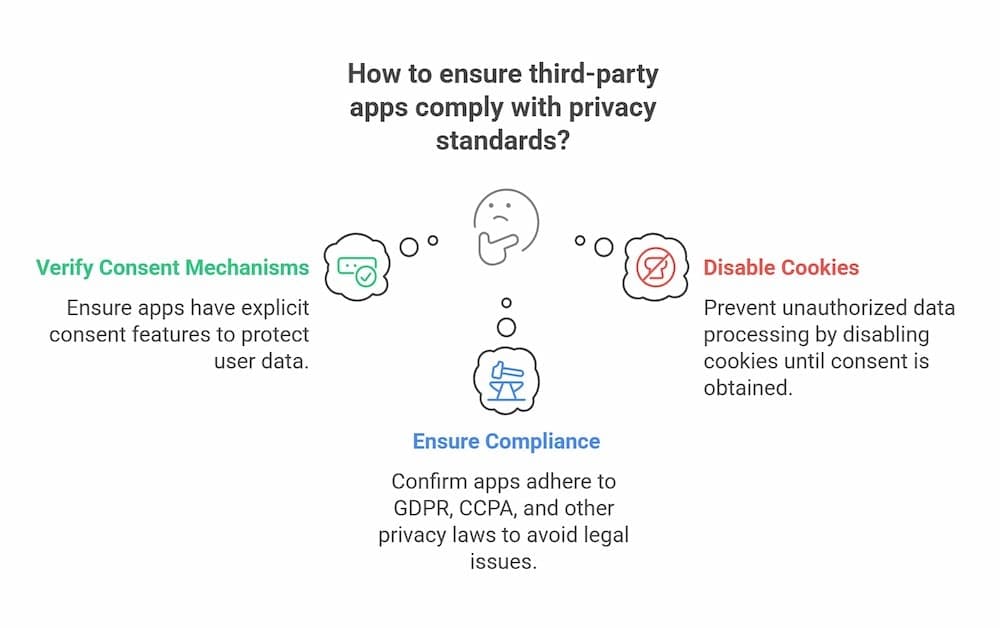
Most merchants fall into the same trap—they install productivity apps without checking if they're actually GDPR-compliant. According to Shopify GDPR Compliance Complete Guide for 2025, you remain legally responsible for every piece of customer data these apps process. One workflow automation app with a shaky privacy policy? You're on the hook for potential fines up to €20M or 4% of global revenue.
The fix: Before installing any app, verify it has a clear Data Processing Agreement (DPA) and transparent privacy policy. ComplyDog's Shopify GDPR implementation guide recommends implementing monitoring tools that track app compliance across your entire stack—because one non-compliant integration can tank your whole operation.
Consent Mechanism Chaos
Inconsistent consent workflows across Shopify, Meta, and email platforms create a compliance nightmare. Reddit merchants report using consent management platforms like Pandectes as a single source of truth—essential when regulators fined more in the first six months of 2025 than all of 2024 combined.
Mobile Optimization Neglect
With over 70% of e-commerce traffic from mobile, skipping mobile optimization isn't just bad UX—it's a conversion killer. Stores implementing advanced Shopify-specific optimization achieve conversion rates up to 36% higher than competitors.
For content workflow automation, platforms like Seo-Writer can help maintain SEO-optimized documentation at scale while you focus on fixing these critical compliance gaps. The platform's automated approach ensures consistent content quality across your knowledge base without adding manual overhead.
Conclusion: Building Your 2026 Competitive Advantage
Building Your 2026 Competitive Advantage
Here's the reality: stores that win in 2026 aren't choosing between SEO performance and compliance workflows—they're automating both simultaneously. The competitive advantage isn't about having faster document processing or better rankings; it's about building systems where secure workflows actually accelerate your organic growth rather than competing with it.
Start with Seo-Writer for automated, SEO-optimized content creation that maintains consistent quality while your team focuses on compliance infrastructure. The platform's three-step process—analyzing SEO opportunities, planning strategic content calendars, and auto-publishing optimized articles—means you're generating traffic growth on autopilot while implementing Shopify Flow workflows for GDPR requests, consent management, and secure document handling.
Your first step: open Shopify Flow today and build one automated workflow. Start simple—maybe automated customer data exports when DSARs arrive, or consent tracking that updates across all integrated apps. Test it thoroughly using Flow's test-run feature before going live. Then layer in automated content creation to ensure your knowledge base and blog support both customer questions and compliance documentation needs.
The merchants pulling ahead aren't working harder—they're building smarter systems that compound over time. Stop choosing between speed and security. Automate both.