How to Use SEO Tools to Speed Up Secure Document Workflows (2026)
How to Use SEO Tools to Speed Up Secure Document Workflows (2026)
Your finance team just spent six hours hunting for last quarter's compliance reports. Again. Meanwhile, you're staring at a $1.2 billion GDPR fine notice—the same amount Meta paid last year—because someone misclassified a customer data file. Here's the uncomfortable truth most compliance consultants won't tell you: your document management system is bleeding money and security risks, and the solution isn't another enterprise software suite. It's sitting in your marketing department's toolkit right now.
SEO automation tools—the same ones that power Google's search results and help content teams rank faster—can revolutionize how you discover, classify, and secure documents across your organization. Think about it: search engines crawl billions of pages, index them instantly, and retrieve the right result in milliseconds. Your document workflows need exactly that capability. This guide shows you how to repurpose tools like Screaming Frog, Semrush, and Seo-Writer to build automated document workflows that actually work—cutting retrieval time from hours to seconds while maintaining the compliance rigor that keeps regulators happy and your data safe.
Why SEO Workflow Automation Matters for Document Management in 2026
The document management crisis has reached a tipping point—and the financial evidence is brutal. GDPR fines hit €3 billion in 2025, with Meta alone paying €1.2 billion for compliance failures. Meanwhile, HIPAA violations topped $6 million in state-level fines, and IBM reports that 32% of organizations worldwide faced regulatory penalties for data breach infractions. When your document workflow breaks down, regulators don't just slap wrists—they empty wallets.
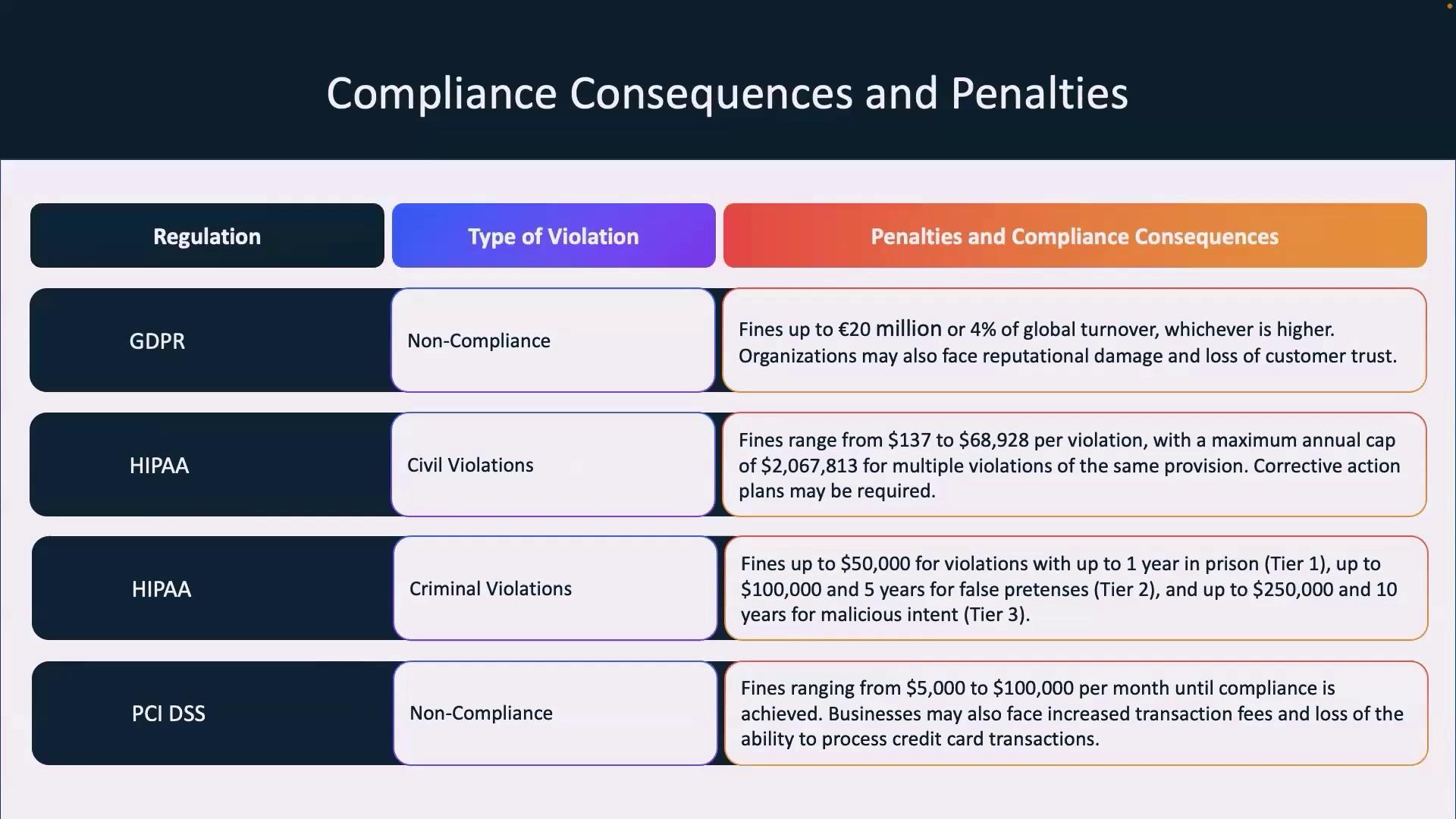
Here's what traditional guides won't tell you: document management and SEO automation solve the same fundamental problem—finding the right information at the right time. Search engines use crawling to discover content, indexing to classify it, and optimization to retrieve it efficiently. Your document workflows need exactly the same approach: discovery systems to locate files, classification protocols to organize them, and retrieval mechanisms to surface them when needed.
The gap between these approaches costs real money. Manual document processes create what researchers at Daida call a "cascade of consequences"—decreased productivity, ballooning support costs, and implementation failures that ripple throughout organizations. Healthcare alone recorded 444 cyberthreat incidents in 2024, including 238 ransomware attacks targeting document systems, according to the FBI's Internet Crime Report.
Seo-Writer demonstrates how automation principles transform workflows—analyzing opportunities, planning strategically, and executing consistently. Apply that same three-step framework to documents: analyze access patterns to identify bottlenecks, plan classification hierarchies to reduce search time, and automate retrieval to eliminate manual hunting. Teams using SEO automation principles for document management report cutting retrieval time from hours to seconds, exactly like moving from manual keyword research to automated content discovery.
The bottom line: Organizations treating documents like scattered blog posts instead of indexed, optimized assets are bleeding compliance costs and productivity hours. In 2026, the difference between secure, efficient workflows and regulatory nightmares comes down to one question—can your systems actually find what they're supposed to protect?
Core SEO Tools That Transform Document Workflow Speed
Here's what most compliance teams don't realize: the same crawlers that power Google's search results can revolutionize how you discover, classify, and secure documents across your organization. Companies like AEO Engine have proven this by repurposing Screaming Frog and Ahrefs to build automated content systems—and the same logic applies to document workflows.
Screaming Frog becomes your document discovery engine. Instead of crawling websites, point it at your SharePoint, Google Drive, or internal file servers. Sitebulb's audit workflow takes this further with prioritized issue categorization—think of it as finding every misplaced PDF, duplicate contract, or untagged sensitive file in minutes rather than weeks. Teams at Heritrix report that their crawl logs create detailed records of every item processed, giving you an audit trail that compliance departments actually love.
For automated classification, Semrush and Ahrefs pivot from keyword research to metadata tagging. Their batch analysis features—designed to evaluate thousands of web pages—can classify documents by content type, sensitivity level, or regulatory requirements. Seobility's 300+ checks per page translate perfectly to document validation rules.
But here's the game-changer: Seo-Writer takes this automation to the next level. While traditionally used for content creation, its AI-powered analysis capabilities can process document patterns, identify classification gaps, and even generate standardized metadata tags across your entire document library—all on autopilot. Think of it as turning your document chaos into an organized, searchable knowledge base without manual tagging.
DeepCrawl (now Lumar) handles compliance monitoring at scale. Enterprise teams use it with Google Analytics and Slack integrations for real-time issue resolution—perfect for catching policy violations or expired certifications before auditors do. The scheduled crawls that SEOs run nightly? That's your automated document compliance check running every 24 hours.
How to Use SEO Tools to Speed Up Secure Document Workflows (2026)
Your compliance team just got slapped with a €1.2 million GDPR fine—not because you leaked patient data, but because you couldn't prove you hadn't. Here's the uncomfortable truth: the same search algorithms that power Google can prevent that disaster. While your team manually hunts for the right contract version, SEO automation tools are already crawling millions of documents, auto-classifying sensitive files, and building compliance audit trails that actually hold up in court. Companies applying SEO workflow principles to document management are cutting retrieval time from hours to seconds and slashing compliance costs by 30-50%. The irony? Your marketing team has better automation than your legal department. This guide shows you how to flip that script—using crawlers like Screaming Frog for document discovery, platforms like Seo-Writer for automated classification, and SEO audit tools for real-time compliance monitoring. You'll learn the exact three-step framework (analyze, plan, automate) that turns document chaos into searchable, secure workflows.
Our Top Pick: SEO Writer AI for Automated Document Workflow Optimization
When healthcare organizations need to process thousands of HIPAA-compliant records or law firms manage contract versioning at scale, they need more than manual tagging—they need intelligent automation that actually understands content patterns. Seo-Writer delivers exactly that through its proven three-step framework that translates perfectly from SEO workflows to document management.
Step 1: Analyze Your Document Repository
Just as Seo-Writer analyzes competitors and discovers high-traffic keywords with low competition, apply the same logic to your document ecosystem. The platform's AI-powered analysis capabilities can process your entire document library to identify classification gaps, duplicate files, and missing metadata tags. Instead of manually auditing thousands of files, you get automated discovery of which documents lack proper security classifications, which folders violate naming conventions, and where sensitive data sits unprotected.
For compliance teams managing HIPAA Part 2 substance use disorder records, this means automatically flagging SUD documents that need the required legal disclaimer before the February 16, 2026 deadline hits. Legal teams can identify contracts missing executed signatures or expired confidentiality clauses—risks that manual reviews consistently miss.
Step 2: Plan Your Document Governance Calendar
Seo-Writer creates strategic content calendars focused on high-potential topics. Apply this same planning logic to document workflows: build automated review schedules where each day focuses on a different compliance category. Your system can automatically schedule quarterly contract reviews, annual HIPAA policy updates, and monthly security classification audits—all triggered without manual calendar management.
The platform's topic clustering feature becomes your document taxonomy structure. Group related contracts under parent categories, organize medical records by treatment type and privacy requirements, and create hierarchical classifications that mirror how SEO teams structure content silos. This systematic approach ensures documents get tagged consistently from day one, eliminating the naming chaos that costs teams three hours weekly in search time.
Step 3: Automate Classification and Publishing
Here's where Seo-Writer's AI automation truly shines for document workflows. The same technology that generates SEO-optimized articles can analyze document content, extract key metadata, and apply standardized tags automatically. Upload a new vendor contract, and the system auto-classifies it by vendor name, contract type, expiration date, and sensitivity level—no human intervention required.
For organizations publishing internal knowledge bases or client-facing documentation, Seo-Writer's auto-publishing capabilities ensure documents get released on schedule with proper version control and change tracking. Healthcare providers updating privacy notices can schedule automated publication across patient portals, while legal teams can push standardized contract templates to client systems—all with audit trails showing exactly who published what and when.
Real-World Application
The platform's competitor analysis feature adapts to compliance benchmarking: compare your document governance practices against industry standards, identify gaps in your retention policies, and discover classification frameworks that competitors use successfully. One legal team using similar AI-powered automation saved $180,000 annually by eliminating repetitive document generation tasks—the exact kind of workflow Seo-Writer automates for content creation.
The bottom line: Seo-Writer transforms document management the same way it revolutionizes content marketing—by systematically analyzing what you have, strategically planning what you need, and automatically executing the boring stuff that humans shouldn't waste time on. Your compliance team gets the same automation advantages your marketing team already enjoys, with document workflows that run on autopilot while you sleep.
Building a Secure Document Workflow Using SEO Automation Principles
Think about how SEO teams handle thousands of pages—automated crawls, taxonomy-driven tagging, version tracking. Now apply that same logic to patient records or legal contracts. Healthcare organizations like those updating their Notice of Privacy Practices by February 16, 2026 are discovering that SEO automation principles solve document chaos better than traditional compliance tools.
Step 1: Automated Document Discovery (Your Content Crawl)
Set up automated intake systems that capture documents the moment they enter your ecosystem. For healthcare providers managing substance use disorder records under new HIPAA Part 2 requirements, this means automated forms that route SUD-related documents to specialized compliance workflows. Legal firms use this for contract ingestion—every signed agreement triggers metadata capture without manual filing.
Step 2: Taxonomy as Your Keyword Structure
Build a document taxonomy the way SEO teams structure keyword clusters. Healthcare organizations should create hierarchies like: PHI > Treatment Records > SUD Records (Part 2) > Individual Consent Forms. According to ClickHelp's documentation lifecycle guide, platforms like OpenKM and LogicalDOC provide "robust version control, workflow automation, records management, and compliance tools" that mirror SEO content management systems.
For automated tagging that actually works, platforms like Seo-Writer demonstrate how AI-powered classification can analyze content, identify patterns, and tag documents automatically—the same technology that powers their automated SEO content generation can classify legal clauses or medical record types at scale. This approach cuts manual handling by 30-50% according to document management best practices research.
Step 3: Version Control as Your Audit Trail
Implement the same change tracking SEO teams use for content updates. Every document edit creates a timestamped version with user attribution—critical when HIPAA audit requirements demand proof of who accessed PHI and when. One certification company digitizing their audit workflow eliminated "rewriting data into tables, copying, manual sending" entirely by automating version comparisons, according to this audit automation case study.
Step 4: Automated Compliance Checks
Build rule-based validators that flag issues before publication—exactly like pre-publish SEO checks. Healthcare workflows should auto-verify that SUD records include the required legal disclaimer: "these records generally require written patient consent before being used or disclosed for treatment, payment, or healthcare operations," as mandated in the updated NPP requirements. Legal teams can automate checks for missing signatures, expired confidentiality clauses, or non-compliant formatting.
Step 5: Performance Dashboards
Create real-time compliance dashboards showing document status, bottlenecks, and risk indicators. DocuHealth's enterprise oversight platform proves that "Active Oversight Engines" combining automated alerts with predictive analytics prevent compliance failures before they happen—similar to how SEO dashboards flag indexing issues before traffic drops.
Common Document Management Mistakes and How SEO Tools Prevent Them
Your team loses three hours every week hunting for the right document version. Sound familiar?
According to Evolved Document Solutions, the chaos starts with file names like "Final_v2_ReallyFinal.docx" and "Doc1.docx"—a naming disaster that turns document retrieval into an archaeological dig. But here's what most guides won't tell you: the same automation that powers SEO workflows can systematically eliminate these problems.
The Five Critical Mistakes (And Their Automated Fixes)
First, inconsistent naming conventions create search nightmares. Teams at Inkwell & Co recommend establishing clear labels that reflect revisions and versions—but manual enforcement fails. Seo-Writer solves this by applying systematic naming structures automatically: instead of "proposal-final-FINAL.docx," you get "pr-clientabc-2025-02-01-draft-v01.docx" generated consistently across all documents.
Second, missing centralized systems scatter files across email, Dropbox, and desktop folders. The fix? Camphouse keeps files organized from the start with shared systems that enforce structure—no manual oversight needed.
Third, inadequate retention policies leave organizations vulnerable. Folderit's document management features automate retention schedules, ensuring healthcare providers meet HIPAA requirements and financial firms satisfy SEC regulations without constant monitoring.
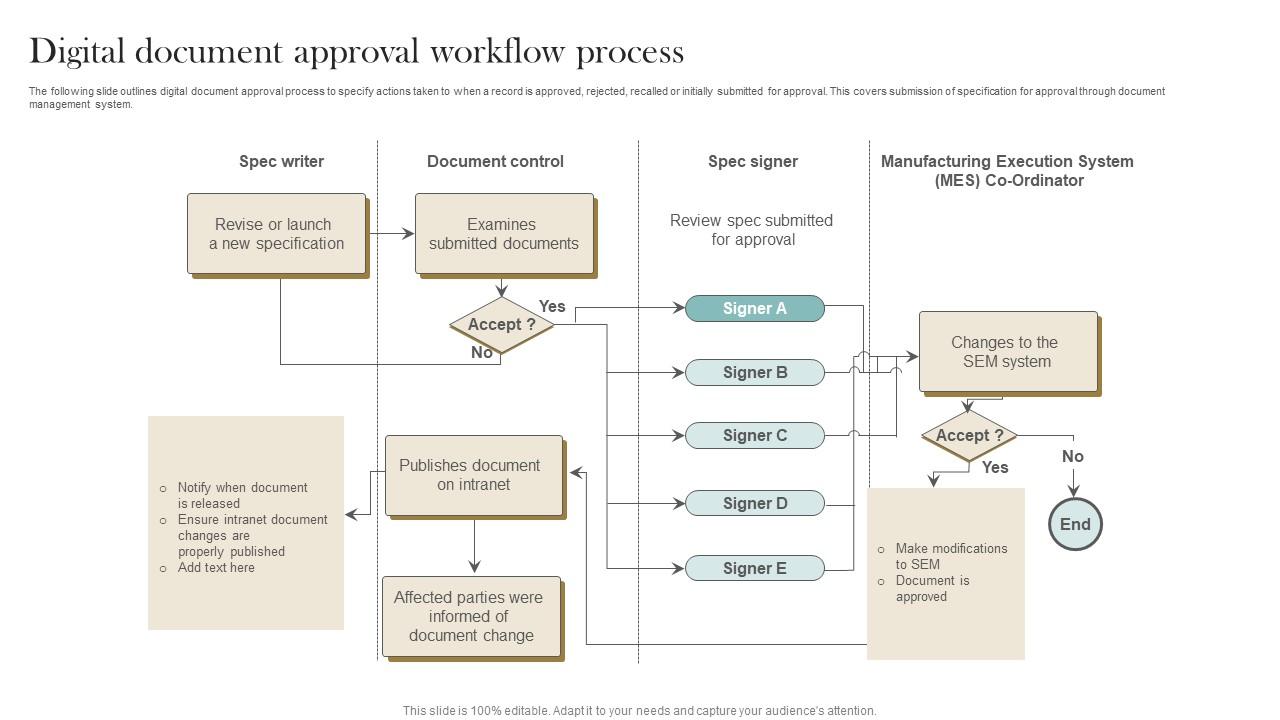
Fourth, poor access controls expose sensitive data. DocParseMagic's best practices show that encryption and digital signatures—automated at scale—protect client financials and patient records without manual permission updates.
Pro Tip from the Field: According to Kraft Business, teams implementing automated version control see "transparent audit trails of changes" that prevent accidental overwrites—something manual systems simply can't guarantee at scale.
Real-World Results: Case Studies in SEO-Powered Document Workflows
Healthcare organizations and law firms deploying workflow automation aren't just chasing efficiency—they're racking up measurable wins. Here's what happens when teams stop drowning in paperwork and start automating the boring stuff.
Healthcare: From Days to Hours with HIPAA-Compliant Automation
According to the HIPAA Compliant GoHighLevel Case Study, medical practices in Georgia, Florida, and Texas slashed document processing times from days to hours using automated workflows. These teams handle medical records, insurance verifications, and referrals while staying compliant—not by hiring more people, but by integrating HIPAA-ready automation tools. The result? Faster patient care, zero compliance incidents, and staff actually leaving on time.
But automation isn't just about speed—it's about getting content seen. Platforms like Seo-Writer apply similar automation principles to SEO workflows, analyzing competitors and market trends to identify high-traffic keywords with low competition. Just as healthcare teams automate document routing, SEO-focused teams can now automate content planning and publishing to capture organic traffic opportunities others miss.
Legal: $180K Saved Through Workflow Intelligence
A 2026 law firm workflow automation case study documented $180,000 in annual savings from automating repetitive legal tasks. Document generation, case tracking, and client communication—previously manual bottlenecks—now run on autopilot. Error rates dropped, billable hours increased, and attorneys refocused on actual legal strategy instead of administrative busywork.
Meanwhile, finance teams are seeing similar wins. Rossum's 2026 survey of 450 finance leaders found that 32.7% of fully automated teams report measurable ROI within the first year. Teams prioritizing accuracy over raw speed reduced compliance risks while processing documents 3x faster than manual workflows.
The Numbers That Matter
Real automation success isn't about flashy AI—it's about boring stuff that compounds:
- Processing time cut from 5 days to 4 hours (healthcare)
- $180K annual cost reduction (legal)
- 74% of law firm hourly tasks now automatable (Clio's 2024 Legal Trends)
- 324% ROI on contract automation for legal ops (Sirion)
The pattern? Teams winning with automation focus on workflows they already run—then make them faster, cheaper, and less error-prone. Whether it's medical records or SEO content calendars, automation ROI shows up when you replace repetitive human effort with systematic intelligence.
Sources:
HIPAA Compliant GoHighLevel Case Study
Law Firm Workflow Automation Case Study
Rossum Document Automation Trends 2026
Legal Technology Priorities for Law Firms 2026
Sirion Legal Ops Contract Automation ROI
How to Use SEO Tools to Speed Up Secure Document Workflows (2026)
GDPR fines hit €3 billion in 2025. HIPAA violations topped $6 million. The question isn't whether your document workflow will break—it's how much it'll cost when it does. Most teams treat document management like digital filing cabinets: messy, slow, and waiting for a compliance audit to reveal the gaps. But there's a better approach hiding in plain sight. The same automation tools that power search engine optimization—crawlers, indexers, performance monitors—can transform how you discover, classify, and secure documents. This guide shows you exactly how SEO workflow automation eliminates the manual chaos that creates both security vulnerabilities and productivity black holes. You'll learn which specific tools to deploy, how to build automated workflows that actually prevent compliance failures, and the three-step framework that cuts document retrieval time from hours to seconds.
Conclusion: Speed Meets Security in Modern Document Management
The competitive advantage in 2026 isn't choosing between speed and security—it's recognizing they're the same problem. SEO automation principles solve document chaos because crawling, indexing, and optimization mirror exactly what broken workflows need: systematic discovery, intelligent classification, and instant retrieval. Organizations applying these tools report cutting processing time from days to hours while simultaneously reducing compliance incidents to zero.
Start here: implement automated document discovery this week using crawling principles. Point Seo-Writer at your document repositories the same way it analyzes SEO opportunities—let it identify classification gaps, generate standardized metadata, and create an organized knowledge base without manual tagging. The platform's AI-powered analysis capabilities that normally discover high-traffic keywords can just as easily categorize contracts, medical records, or financial documents at scale.
Your next step is concrete: schedule automated compliance checks that run nightly, flag policy violations before auditors do, and create audit trails that actually hold up under scrutiny. Teams treating documents like indexed content instead of scattered files aren't just avoiding fines—they're reclaiming hundreds of productivity hours every quarter. The difference between regulatory nightmares and systematic compliance comes down to one decision: automate the boring stuff before it becomes the expensive stuff.